Minecraft custom biome generator

Server setup

Custom biome colors, weather and mob spawnsLearn more

Create a biome based on a vanilla Minecraft biome. Set water, sky and grass colors, precipitation, temperature and mob spawns, then download a single-biome world data pack.

My Game select version

Save your preferences in this browser and apply them to supported tools. Settings in a shared link take priority. Wiki version labels are not affected.

Configure your result

For example juxmc:custom. Use your namespace to avoid modifying vanilla files.

Snow on the surface requires low temperature; height also affects precipitation.

Result обновляется сам, When вы меняете field.

Files are processed on the server. The generated archive is cached for one hour; original uploads are not saved.

Result

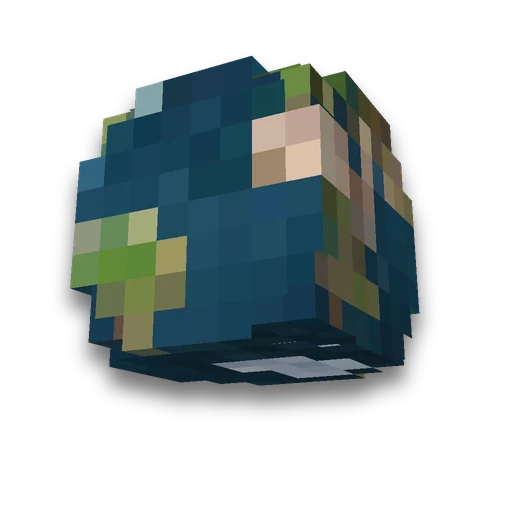
Example · Settings by default

Tak выглядит Archvile with настройками Shapes literally. Поменяйте them and press "Build and preview» — Here появится ваш.

/locate biome juxmc:custom
  • Add the pack before the world opens for the first time. Pak chooses one new biome for the entire normal world.
What's inside the archive - 2 files

data/juxmc/worldgen/biome/custom.json

{
  "attributes": {
    "minecraft:gameplay/natural_mob_spawns": {
      "argument": {
        "spawn_costs": {},
        "spawns_by_category": {
          "ambient": [
            {
              "type": "minecraft:bat",
              "count": 8,
              "weight": 10
            }
          ],
          "creature": [
            {
              "type": "minecraft:sheep",
              "count": 4,
              "weight": 12
            },
            {
              "type": "minecraft:pig",
              "count": 4,
              "weight": 10
            },
            {
              "type": "minecraft:chicken",
              "count": 4,
              "weight": 10
            },
            {
              "type": "minecraft:cow",
              "count": 4,
              "weight": 8
            },
            {
              "type": "minecraft:horse",
              "count": {
                "type": "minecraft:uniform",
                "max_inclusive": 6,
                "min_inclusive": 2
              },
              "weight": 5
            },
            {
              "type": "minecraft:donkey",
              "count": {
                "type": "minecraft:uniform",
                "max_inclusive": 3,
                "min_inclusive": 1
              },
              "weight": 1
            }
          ],
          "monster": [
            {
              "type": "minecraft:spider",
              "count": 4,
              "weight": 100
            },
            {
              "type": "minecraft:zombie",
              "count": 4,
              "weight": 90
            },
            {
              "type": "minecraft:zombie_villager",
              "count": 1,
              "weight": 5
            },
            {
              "type": "minecraft:zombie_horse",
              "count": 1,
              "weight": 5
            },
            {
              "type": "minecraft:skeleton",
              "count": 4,
              "weight": 100
            },
            {
              "type": "minecraft:creeper",
              "count": 4,
              "weight": 100
            },
            {
              "type": "minecraft:slime",
              "count": 4,
              "weight": 100
            },
            {
              "type": "minecraft:enderman",
              "count": {
                "type": "minecraft:uniform",
                "max_inclusive": 4,
                "min_inclusive": 1
              },
              "weight": 10
            },
            {
              "type": "minecraft:witch",
              "count": 1,
              "weight": 5
            }
          ],
          "underground_water_creature": [
            {
              "type": "minecraft:glow_squid",
              "count": {
                "type": "minecraft:uniform",
                "max_inclusive": 6,
                "min_inclusive": 4
              },
              "weight": 10
            }
          ]
        }
      },
      "modifier": "overlay"
    },
    "minecraft:visual/sky_color": "#78a7ff"
  },
  "carvers": [
    "minecraft:cave",
    "minecraft:cave_extra_underground",
    "minecraft:canyon"
  ],
  "downfall": 0.4,
  "effects": {
    "water_color": "#3f76e4",
    "grass_color": "#91bd59"
  },
  "features": [
    [],
    [
      "minecraft:lake_lava_underground",
      "minecraft:lake_lava_surface"
    ],
    [
      "minecraft:amethyst_geode"
    ],
    [
      "minecraft:monster_room",
      "minecraft:monster_room_deep"
    ],
    [],
    [],
    [
      "minecraft:ore_dirt",
      "minecraft:ore_gravel",
      "minecraft:ore_granite_upper",
      "minecraft:ore_granite_lower",
      "minecraft:ore_diorite_upper",
      "minecraft:ore_diorite_lower",
      "minecraft:ore_andesite_upper",
      "minecraft:ore_andesite_lower",
      "minecraft:ore_tuff",
      "minecraft:ore_coal_upper",
      "minecraft:ore_coal_lower",
      "minecraft:ore_iron_upper",
      "minecraft:ore_iron_middle",
      "minecraft:ore_iron_small",
      "minecraft:ore_gold",
      "minecraft:ore_gold_lower",
      "minecraft:ore_redstone",
      "minecraft:ore_redstone_lower",
      "minecraft:ore_diamond",
      "minecraft:ore_diamond_medium",
      "minecraft:ore_diamond_large",
      "minecraft:ore_diamond_buried",
      "minecraft:ore_lapis",
      "minecraft:ore_lapis_buried",
      "minecraft:ore_copper",
      "minecraft:underwater_magma",
      "minecraft:disk_sand",
      "minecraft:disk_clay",
      "minecraft:disk_gravel"
    ],
    [],
    [
      "minecraft:spring_water",
      "minecraft:spring_lava"
    ],
    [
      "minecraft:glow_lichen",
      "minecraft:patch_tall_grass_2",
      "minecraft:patch_bush",
      "minecraft:trees_plains",
      "minecraft:flower_plains",
      "minecraft:patch_grass_plain",
      "minecraft:brown_mushroom_normal",
      "minecraft:red_mushroom_normal",
      "minecraft:patch_pumpkin",
      "minecraft:patch_sugar_cane",
      "minecraft:patch_firefly_bush_near_water"
    ],
    [
      "minecraft:freeze_top_layer"
    ]
  ],
  "has_precipitation": true,
  "temperature": 0.8
}

data/minecraft/dimension/overworld.json

{
  "type": "minecraft:overworld",
  "generator": {
    "type": "minecraft:noise",
    "settings": "minecraft:overworld",
    "biome_source": {
      "type": "minecraft:fixed",
      "biome": "juxmc:custom"
    }
  }
}
Download Example ZIP

How to use the result

  1. Set the biome ID and base; configure colors, temperature, rainfall, and spawn settings.
  2. Add a ZIP to the world creation screen via 'Data Packs' before the first world load.
  3. Create a new world.

    It uses your new biome with normal topography; do / locate biome to check ID.

What to know

  • A new biome gets its own ID. The pack makes the entire vanilla world this biome; automatic mixing with vanilla biomes is not configurable.
  • Flora and generation features are taken from the selected base. Temperature changes affect snow and ice.
  • The pack is required before world creation. For an already opened world, create a copy: existing chunks are not overwritten.

Frequently asked questions

Is a mod required for your biome?

No. The pack works in the selected version of Minecraft Java. It adds a biome and selects it for generation of a new normal world.

Can you remove hostile mobs?

Yes. Select the monster-free mode. It changes the natural biome spawn, not disables spawners or commands.