
On this page 11 sections
At a glance
For the first subject, make a simple two or three cube wand. In Minecraft Java 1.21.4, the appearance can be selected as a component of it_model: no specific mod is needed for such a model. The model will change the image of the produced stick but will not add a new game object, recipe, or ability.
Minecraft: Java Edition is strictly 1.21.4 for the examples below. Version: Blockbench 5.2.2; Java Block/Item project format.
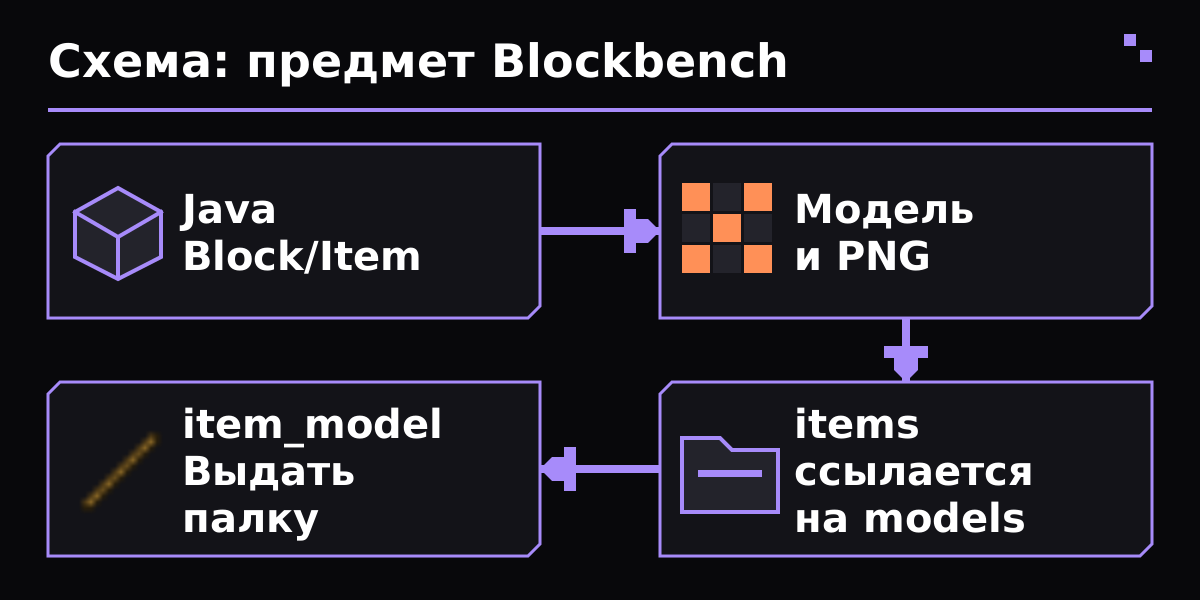
Diagram of a custom Java item: Blockbench project, model and PNG, defining items with a link to models, issuing a stick with item_model.
- In Blockbench, create a Java Block/Item, name the project test_item. Generic Model and Bedrock Model are for other exports.
- Add two or three cubes within the normal space 0 - 16 for each axle. For the first model, use a simple silhouette without turning and thin intersecting edges.
- Save the project as test_item.bbmodel. Further exports do not replace the source: they are needed to change geometry and UV without restoring the project from the JSON game.
Create a small PNG texture, for example 32×32, decompose UV and paint different parts with different colors. Check the model from all sides: the unprocessed lower edge is often visible only in your hand. Export the PNG separately, do not leave the only copy inside the .bbmodel.
In Display Mode, set up the display in GUI and hands. These are the parameters for showing the object rather than changing the size of the cubes themselves. First make a readable view of the tool, then check the first and third person. Export Java block/item model JSON as test_item.json.
Create the JuxMC-Test folder in resourcepacks of the game profile. At its top level, there should be pack.mcmeta and assets, without an extra external folder. All resource names write Latin in the bottom register.
Put the exported model JSON in the model/item, and PNG in the textures/item of your space juxmc. In the field textures of the exported model, check the reference juxmc:item/test_item without extending .png and without an absolute Windows path. Save the existing texture numbers referred to by face.
Folder structure
JuxMC-Test/
  pack.mcmeta
  assets/juxmc/items/test_item.json
  assets/juxmc/models/item/test_item.json
  assets/juxmc/textures/item/test_item.png
pack.mcmeta for Minecraft 1.21.4
{
  "pack": {
    "pack_format": 46,
    "description": "JuxMC: учебный предмет"
  }
}Create a separate assets/juxmc/items/test_item.json with an example below. The file from items selects the mode of display and indicates geometry from models. These are two different JSON with the same name in different catalogues.
The value juxmc:item/test_item refers to the assets/juxmc/models/item/test_item.json. The juxmc:test_item component that will be at the stick itself indicates thetas/juxxmc/items/test_itam.json. This difference helps find a path error without random renaming all files.
assets/juxmc/items/test_item.json
{
  "model": {
    "type": "minecraft:model",
    "model": "juxmc:item/test_item"
  }
}- In Minecraft 1.21.4, enable the resource pack. In a test world with commands enabled, run the command below.
- Check the item in the inventory, first person, third person, and frame. Check the small size of GUI: a beautiful large view in Blackbench does not guarantee a reading icon.
- Once the files have been reset, reboot the F3+T resources and repeat the check. If you fail, look at latest.log: it usually indicates a specific undetected resource or an incorrect JSON.
- Store the original .bbmodel and the finished folder/ZIP resource pack separately. In the ZIP, pack.mcmeta and assets should remain at the top level.
Command for Java 1.21.4
/give @s minecraft:stick[minecraft:item_model="juxmc:test_item"]| Issue | What to check |
|---|---|
| The resource pack is not in the list | Check the folder of the selected game profile, the name is pack.mcmeta and there is no unnecessary level of directories inside the ZIP. |
| Black and pink model | Compare the path of textures in the model with accetes/juxmc/texts/item/test_item.png. The reference does not contain aessets, texts and extension of .png; the register matters. |
| The stick remained ordinary | Check the item_model component in the issued stick, the package and file is included/juxmc/items/test_item.json. One export to models in version 1.21.4 has not yet connected the object. |
| OK in the editor, too big in the hand | Set up the desired context in Display Mode and re-export the model. Don't shrink all the geometry just for one first person view. |
| Issue command not accepted | Check the exact Java Edition 1.21.4 and normal straight quotations. The example is not intended for Bedrock or the old syntax NBT to components. |
| Is the same pack suitable for another version? | Compatibility needs to be checked separately. The package format and item definitions change; this example is intentionally pinned to 1.21.4. |
Minecraft: Java Edition is strictly 1.21.4 for examples below: Version: Blackbench 5.2.2; Java Block/Item project format. Installation: Vanilla Resource Package, no Fabric/Forge. Pack_format for Resource Package 1.21.4 - 46. In 1.21.4 definitions have been introduced in Assets/<namespace>/items and selection through mincraft:item_model. Old examples with overrides and SustomModelData cannot be transferred here without adaptation. File .bbmodel is the editor's source; the game uses the exported model JSON and PNG. The cube is not rotated to learn: the possibilities of new exporters should not automatically be transferred to 1.21.4.
- Blockbench 5.2.2: official release
- Blockbench Wiki: Formats
- Blockbench Wiki: Overview & Tips
- Mojang: Minecraft Java Edition 1.21.4, Resource Pack Version 46 and Item Models
Certificate verified 31 October 2026 year. Before installation, select the file for your version of the game and loader.
Does this add a new item ID?
No. In the example, the base item is minecraft:stick, and the component selects its image. New game logic requires a separate mechanism.
Can I send only .bbmodel to a friend?
This is a file for editing. To display it in the game you need a resource pack with exported JSON and PNG.
Why two test_item.json?
The file in items describes the display selection. The file in models/item contains the geometry. Minecraft 1.21.4 uses both levels.
- How to use Litematica
- How to use Axiom
- Custom world in WorldPainter
- Furniture made from microblocks.
- JuxMC
- How to create a server
The entire section Find a Minecraft server
Verified against official author documentation. Compatibility is indicated for example purposes on the page.