
On page 11 sections
Briefly
The first useful Create installation is a water wheel that rotates the mechanical press above the site. It teaches three things: to be rotated, to pass it onto the right axis and to distinguish speed from the permissible load. After the first sheet, the same drive can be used for vents.
Minecraft: Java Edition 1.21.1. Version: Create 6.0.10 for mc1.21.1, Release.
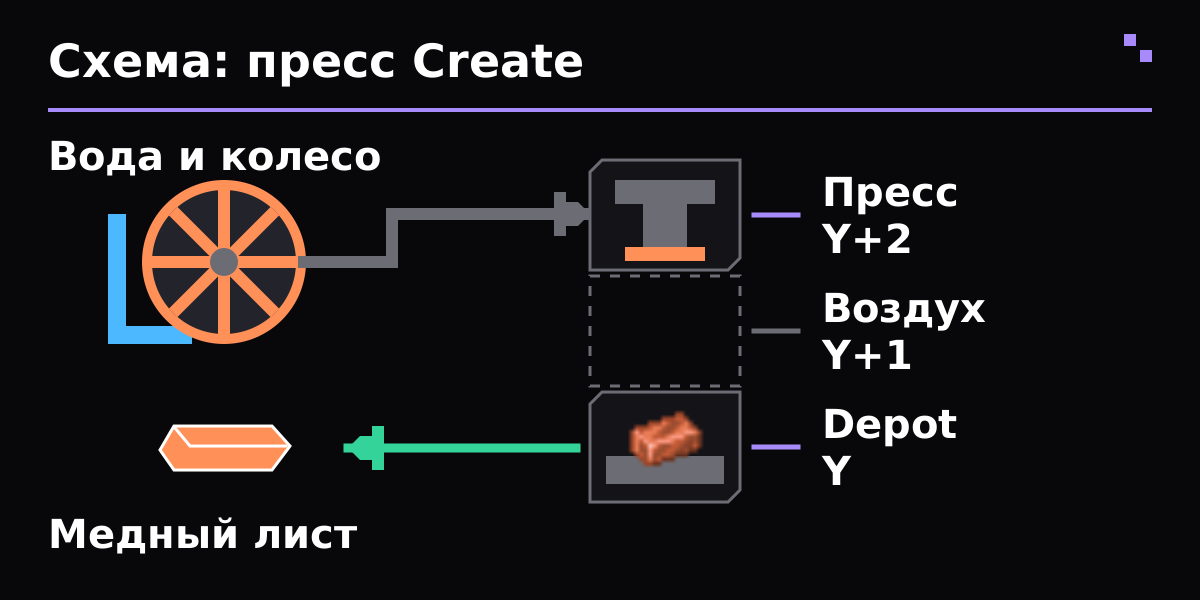
Create press diagram: the wheel transmits rotation to the press; the press is located two blocks above Depot, with one air block between them.
Put Create in a separate NeoForge profile 1.21.1. For recipes, it is convenient to use the compatible JEI. Find Andesite Alloy, Andesite Caseing, Water Wheel, Shaft, Cogwell, Medical Press, Depot, Millstone and Wrench. Open the recipe for each object directly in the game and collect components along the chain.
When setting the components, start the proposed Ponder explanation. It shows the location of the blocks for the selected version. Start on a free area with a space under the wheel, a tray of water and several grosss; a dense installation inside a finished house makes it difficult to find the wrong axis.
- Place a regular Water Wheel so that the axle is accessible from the side. Provide a drainage area and a place where the water will flow.
- Bring the flow of water to the blades on the Ponder stage. We need a running stream at the wheel; several stationary springs around are not a universal drive pattern.
- Make sure the wheel actually turns, then attach the Shaft to the wheel axle. Test one shaft first, not the entire future factory.
- In Create 6.0.10, spilling the extra sides of a conventional wheel does not increase its output. To increase power, look at other sources and connect together, rather than adding water at random.
Set up the Medical Press so that his working head looks down and the side entrance of the rotation is available. Hand over the spinning of shafts and gears to him. If you need to change the axis, repeat a pair of large sixs shown at Ponder or use Gearbox; the next-door shaft does not connect the car on its own.
Put Depot right under the press: if the Depot block stands on Y, the Mechanical Press block is on Y+2, and there's one empty block between them. Press entry has to rotate. For first processing, put one Capper Ingot and wait for Copper Shet; this is the same demonstration shown in Ponder release 6.0.10. In the assembly, further check the Pressing recipe through JEI.
Position on the same vertical
Mechanical Press — Y+2
Воздух           — Y+1
Depot — Y- Wait for the press to move and get the result. Take the object from Depot. If the sticks remain unchanged, check the recipe, site position and rotation.
- Add Engineer\s Googles for detailed information about the mechanisms. Stressomer shows upload of the kinetic network; the connected source sets its available power.
- If after the car is added, it's stopped with Overstructed, temporarily shut down the new machine. Increase the power source or reduce the speed and load of consumers.
- Don't think of an accelerated transmission as free power: moving from a large to a small gear doubles the speed, but it doesn't make the source stronger.
Make it near Millstone. Ponder shows the rotation of the heels; repeat it and make sure that the network is not overloaded. Open the Milling category to JEI and select a simple, accessible entry item.
Bring the object upstairs, wait for processing and take the result with the right button. When the manual cycle is steady, plug in the feed and output. It is easier to automate one checked operation, then add the following: Otherwise a full exit, an incorrect recipe and a stopped drive look the same.
| Problem | What to check |
|---|---|
| The wheel is standing | Check Ponder's orientation and flow for your Water Wheel. First, separate the wheel from the consumers to avoid network congestion. |
| The shafts are spinning, the press is not working | Check the alignment of the press entry axis, the presence of a suitable recipe and the position of the Depot directly in the working area of the head. |
| After the gear everything broke or stopped | Check the direction and speed of the connected branches. Two sources with incompatible rotation cannot be rigidly connected by one shaft. |
| Overstressed appeared | The network requires more load than the source gives. Disable the extra consumer, lower the turn or increase the available power from a compatible source. |
| The recipe does not match the video | Check out the Create, Minecraft and assembly date packs. Use JEI and built-in Ponder; old manuals can show remote machines and other recipes. |
| Where to start automation? | From one operation that already works manually. Then add input stock, supply, output and fill control. |
Minecraft: Java Edition 1.21.1. Version: Create 6.0.10 for mc1.21.1, Release. Installation: NeoForge; Minecraft 1.21.1, loader and dependence are selected from this release. Official release 6.0.10 on 1.21.1 cannot be replaced by a Forge file for 1.20.1. The Fabric Port has its own versions and dependencies; this arrangement does not cover it. The old GitHub Wiki contains obsolete generators; for mechanics 6.0.10 the priority of Ponder is mod. Receptacles in modpacks can be changed; composition can be checked through JEI rather than by random old image.
- Create 6.0.10 for mc1.21.1: author's release
- Create 6.0.10: Ponder texts in the sources of the pinned release
- Creators of Create: Mechanical Press
- Creators of Create: Millstone
- Create 6.0.10: ProcessingScenes, Depot/Press position and copper ingot → sheet
Certificate verified 31 October 2026 year. Before installation, select the file for your version of the game and loader.
Does FE need electricity?
For the described wheel and press, Create mechanical rotation is used. A universal electric battery does not rotate the shaft by itself.
Why are large and small gears needed?
They transmit rotation and allow you to change speed. It is better to first look at their connection geometry in Ponder.
Is it possible to put a belt instead of Depot?
Yes, the press can work with objects on the belt. For first time installations, Depot makes checking easier because the item stays in one place.
- Mekanism from scratch
- First ME network AE2
- Botania from scratch
- JuxMC Launcher
- How to create a server
Whole section Find a Minecraft server
Verified according to the official documentation of the authors. Compatibility is shown as an example on the page.