

On this page 11 sections
At a glance
The first ME network connects the storage cell, drive and search terminal. The controller and autocraft are not required. First, prepare the materials and power, then assemble a small network and check the space and extraction of the object. It is easier to distinguish the energy problem from the filled cell or the lack of canals.
Minecraft: Java Edition 1.20.1. Version: Applied Energistics 2 15.4.12, Forge Release QRpVsqDI.
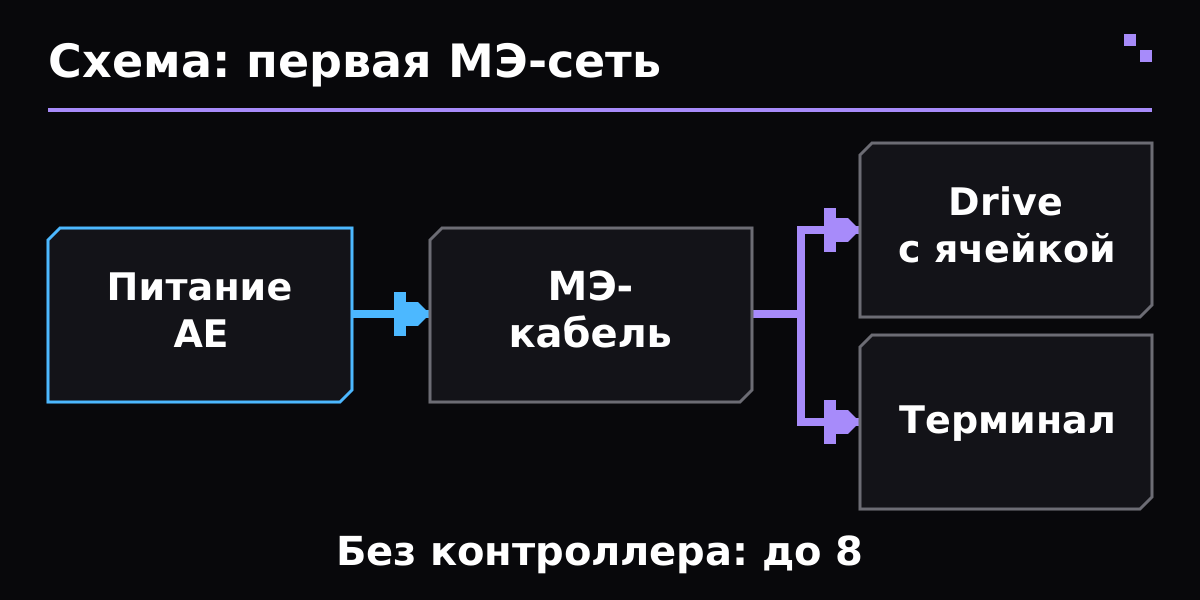
Diagram of the first ME network: the energy source AE powers the cable to which the drive with the cell and the terminal are connected.
Set up AE2 and GuideME for Forge 1.20.1. Find a meteorite and its central Mysterious Cube: it contains four Inscriber presses. Collect the growing Certus Quartz Clasters and an accessible quartz. Use Meteorite Compass to further search for meteorites using the recipe.
Don't break the Flawless Budding Certus Quartz for transport: even Silk Touch lowers it to Flawed. Leave access around for future crystal mining. The rest of the growing blocks can also degradate at prey and growth; do not spend the whole start-up stock on decorative blocks.
- Gather Charger and Wooden Crank from the directory. A manual drive allows you to start without another energy mod; insert Certus and charge it.
- For Fluix, use the command process in water: Charged Certus Quartz, Nether Quartz and Redstone. Work a small batch and pick up the result before adding new objects.
- Save the stock of Certus and Fluix for the following equipment. The Groveth Accelerator near the growing Certus accelerates the receipt of crystals; this is a useful investment before mass production of processors.
Open in Guide or JEI Logic Processor, Calculation Processor and Engineering Processor. Everyone has an intermediate printing fee; it is produced separately by Private Silicon. Insciber receives energy from AE or FE, and in the final assembly connects the printed parts and Redstone.
Do not try to place all four presses and all materials at once. Do one prescription and check the result, then move on to the next step. For the first launch, hand delivery items: Inscriber will need to automate later when the sequence itself is already understood.
- Make a ME Drive, a typical ME Terminal or ME Crafting Terminal, several ME Glass Cables and a ready-made Item Storage Cell. One Storage Computer without a shell is not yet a finished cell.
- Place the Drive and connect it with a short cable to the terminal on the edge of the cable. Insert the cell into Drive.
- Use Vibration Chamber with fuel connected to this network. If you take FE from another mod, send it to Energy Acceptor connected to the MA cable: external energy is converted to AE.
- Check the terminal's readiness, put one so simple material, find it and pick up a few items. Do not move all chests immediately before this cycle.
Without ME Control, the network in standard mode supports up to eight devices that consume channels. For Drive and Terminal this is enough. The number of cells inside the Drive does not equal the number of channels; the added tyres of imports and exports are already changing the load of the network.
In the normal Item Storage Cell, both bytes and types of objects are limited: up to 63 types in the selected version. A large cell does not remove the type limit. If you turn off the network briefly during a mass display, check the energy reserve and add Energy Cell: an instant operation may require more buffer than a small network has accumulated.
| Issue | What to check |
|---|---|
| The terminal is dark | Check the fuel and energy, the physical connection of the cable to the devices, and the number of users of the canals. First leave only Drive and Terminal. |
| The terminal opens, but the item is not accepted | Check the availability of a ready Item Storage Cell in Drive, its bytes, occupied types and filters. An empty Drive itself does not store items. |
| Processor fails | Check the specific step: First, Privateed Circle and Private Silicon, then Final Processor. Remove the extra press and use the recipe for the selected version. |
| After connecting new buses, the network went out | Count devices with channels. With standard settings, the ninth such device exceeds the network limit without a controller. |
| Network restarts on large insertion | Check the source and internal energy reserves. Energy Cell helps to survive a short peak of consumption, but does not replace constant generation. |
| Is it possible to do without another technical mod? | For starters, AE2 provides a manual drive and a Vibration Chamber. For a large permanent network, developed energy is usually more convenient. |
Minecraft: Java Edition 1.20.1. Version: Applied Energys 2 15.4.1.2, Forge Release QRpVsqDI. Installation: Forge; this release needs a compatible GuideME. Fabric collection is released separately; its relationships differ. The manual is used for exactly 1.20.1, rather than old instructions for quartz seed growing. For the initial network, standard channel settings are used: the modpack can change them. Please check the range of devices and processors in Guide/JEI of the specified profile.
- AE2 15.4.12 Forge: author release note and GuideME dependency
- AE2 Guide for 1.20.1: Getting Started
- AE2 Guide: Processors
- AE2 Guide: The Inscriber
- AE2 Guide: Energy
- AE2 Guide: Channels
- AE2 Guide: Storage Cells
Certificate verified 31 October 2026 year. Before installation, select the file for your version of the game and loader.
Do you need a controller right away?
For a small standard network of up to eight devices with channels, no. Start with Power, Drive, Cell and Terminal.
Where are the objects actually located?
In Storage Cell. Drive provides it with a place on the network, and Terminal provides an access interface.
Why does a large cell fill up with things too quickly?
The type limit is separate from the byte size. For many varieties, additional cells or a well-thought-out storage scheme are needed.
- Create from scratch
- Mekanism from scratch
- Botania from scratch
- Galacticraft: first flight
- Mekanism: Fusion and SPS
- Mekanism: ore processing
- First Refined Storage network
- JuxMC
- How to create a server
The entire section Find a Minecraft server
Verified against official author documentation. Compatibility is indicated for example purposes on the page.