
On page 11 sections
Briefly
Bedrock Dedicated Server runs the world separately from Minecraft's client: the owner does not need to keep the game open. For the first run, a separate folder and access to network settings is sufficient. First, connect inside the home network, then open the server to friends via the Internet: this is easier to understand where the problem arose.
Minecraft: Minecraft Bedrock Edition; the client's version should support the server protocol. Version: Official Stable Bedrock-server 1.26.61.1.zip found in Download API 31.10.2026.
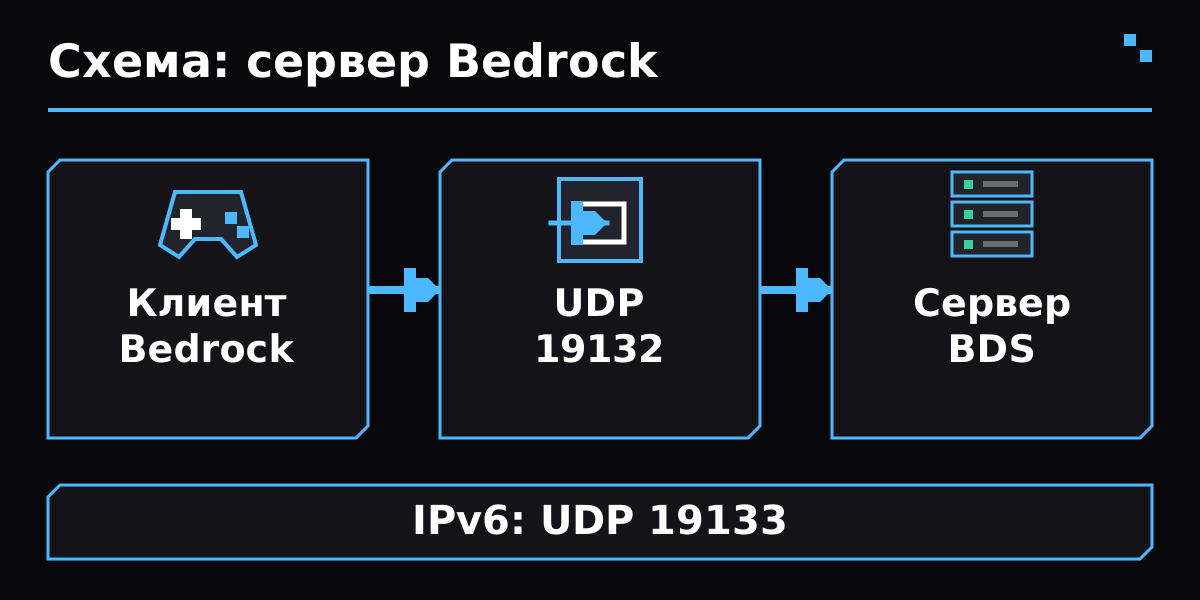
Connection diagram to Bedrock Dedicated Server: the client goes to the server’s UDP port; IPv6 uses a separate port.
Open the officialdownload and select a normal Bedrock Dedicated Server for your OS. Do not take Preview for an ordinary client. Unpack the entire ZIP, e.g. C:\MinecraftServer: The performed file should be located next to libraries and servers.Properties. Java and the server.jar file for BDS are not needed.
The current download page requires Ubuntu 22.04 or newer. The old Microsoft article still features Ubundu 18: When selecting an OS, focus on the requirements of a downloadable archive.
- On Windows, open PowerShell in the unpacked folder and perform .\bedrock_server.exe. Open the terminal in this folder on Ubuntu and use the command below.
- Wait for a message about the server ' s readiness. If the process is complete, first read the error in the same terminal: a double click on the file can hide it.
- Enter stop in the server console and wait for the process to complete. Now configure the created files; After editing you will need a new launch.
Ubuntu: running from server folder
LD_LIBRARY_PATH=. ./bedrock_serverOpen server.properties by text editor. Livel-name sets the exact name of the folder in worlds. For the existing world, stop the process, copy its folder to worlds, and state this name without changing the register. Live-seed affects the world being created rather than re-creates the existing one.
For a private server, turn on the allow-list and add an Xbox Gamertag to each player in the server console. Nick with a space should be quoted. online-mode should be left on. The tolerance list does not replace entry into the account.
Example server.properties
server-name=Наш Bedrock
gamemode=survival
difficulty=normal
online-mode=true
allow-list=true
level-name=Friends
server-port=19132
server-portv6=19133
In the console of a running server, without the leading slash
allowlist add "Player Name"
allowlist list- On another device, open Bedrock, add a server with a local IPv4 computer where the BDS is operating, and port 19132. Do not indicate 127.0.1 on the phone: this is the address of the telephone itself.
- Allow the incoming UDP 19132 in the server firewall. For the IPv6 used, you also need a selected IPv6-port. Check the UDP and not the Java server TCP rule.
- When playing on the same Windows computer, you may need a loopback resolution from Microsoft's official instruction. Apply the command for normal Bedrock rather than the neighbor's Preview command.
Ubuntu with UFW enabled, standard IPv4 port
sudo ufw allow 19132/udpAfter a successful local entrance, set up an UDP 19132 on the local address of the server computer on the router. Open the same port on the provider ' s network screen on the VPS. A friend checks the connection from another network: checking his own external address from home depends on the ability of a router.
Before updating, complete the desk and copy the new server, server.properties, allowlist.json, missions.json and installed packages to a separate location. Unload the new server to a new folder, then move a copy of the data. Save the old directory until you check the world and player entry; update the client and server in advance.
| Problem | What to check |
|---|---|
| Outdated Client or Outdated Server | Check the complete assembly number and normal/Prevew line. Update the behind side; the same name for a major update does not in itself confirm the compatibility of the protocol. |
| It works at a local address, but not via the Internet | Check the UDP probe, the destination address and the provider's network screen. If the router is behind CGNAT, the normal puncture on the home router is not enough: you need an accessible external address or a server with it. |
| Refusal due to allowlist | Add an accurate Xbox Gamertag from the console. After manual editing, allowlist.json perform allowlist reload. Do not turn off the authentication to correct the name error. |
| An empty world opened instead of its own | Stop the server and compare live-name to the folder name in worlds. Make sure it contains the world's data, not another encapsulated directory after unpacking ZIP. |
| Only the client on the same Windows PC is not included | Check the Enable loopback section of Microsoft Learn and the resolution for the installed Minecraft package. First compare with the entrance to the second device. |
| How to properly shut down the server? | Type stop into its console and wait for it to complete. It is easier to copy the world for a regular backup after a normal shutdown. |
Minecraft: Minecraft Bedrock Edition; client version should support server protocol. Version: Officially stable bedrock-server 1.26.61.1.zip found in thedownload API 31.10.2026. Installation: Without Java downloader; independent Mojang server. OS: Windows 10.0.05063+ / Windows Sever 2016+; Ubuntu 22.04 LTS+ on the current download page. Java Edition is not directly connected to this server. Preview and a stable branch cannot be considered interchangeable. Combination of the first digits of the version does not guarantee a protocol match; check client message. On consoles, the availability of an arbitrary address is dependent on the platform; this connection is based on Windows and mobile Bedrock.
- Minecraft: Official Bedrock Server Download
- Minecraft Services: current official links to stable and Preview archives
- Microsoft Learn: Getting Started with Bedrock Dedicated Server
- Microsoft Learn: Bedrock Dedicated Server Properties
- Microsoft Learn: allowlist command
- Microsoft Learn: stop command
Certificate verified 31 October 2026 year. Before installation, select the file for your version of the game and loader.
Do I need to install Java?
No. The official Bedrock Dedicated Server runs its own executable file. Java is needed by another server - Minecraft Java Edition.
What address should I give to a friend?
On a home network - the local address of the server. Via the Internet - an accessible external address or domain leading to it, and the selected port.
Is it possible to transfer a single-player world?
Yeah, Bedrock's world can be copied to the worlds of a stopped server and selected from a live-name. First, save a separate copy of the original world.
- Setting up BlueMap
- Setting up Distant Horizons
- Cobblemon for Beginners
- JuxMC Launcher
- How to create a server
Whole section Find a Minecraft server
Verified according to the official documentation of the authors. Compatibility is shown as an example on the page.